Build Your Own MCP Server For AI Agents
This challenge is to build an MCP server and hook it up to an AI agent.
So What Is MCP And Why Would You Want To Build An MCP Server?
MCP stands for Model Context Protocol. It is an open standard for connecting AI applications to other systems. It solves a similar problem to the Language Server Protocol (LSP). Where LSP allows language servers and development tools (i.e. editors and IDEs) to communicate so that any editor can use the language server for a specific programming language and a language implementor only needs to provide on Language Server to support all IDEs and editors, MCP allows all AI application and other systems to talk without every AI application and every system having to write bespoke clients and APIs for each other.
While we’re on the topic, if you want to learn more about LSP there is a build your own language server coding challenge.
The benefit of an MCP server is that it allows an AI application (i.e. an agent) to connect to data sources (e.g. documentation for an API, local files, document stores or data bases), tools (e.g. GitHub, Notion, search engineers, Playwright, or Figma), and workflows, enabling them to access information not in their training data and perform tasks.
The Challenge - Building An MCP Server
In this coding challenge you are going to build an MCP server that will allow your favourite AI coding agent to find out if there are any shared solutions to a specific coding challenge.
Step Zero
Drawing inspiration from one of the first programming languages I learned, C, Coding Challenges is zero-indexed. In step zero your job is to create a new project, create a new git repo and pick your technology stack.
You can tackle this coding challenge in any programming language. If you pick Python, Go, TypeScript, Java, Kotlin, C#, PHP, Ruby, Rust, or Swift there are SDKs for all other languages, or if you want to learn how to implement the protocol yourself, you’ll be implementing the protocol and transport directly.
If you’ve never built a protocol and transport layer before, it’s a great opportunity to learn, if you’re here to learn how to extend and AI application, leverage one of the SDKs.
Step 1
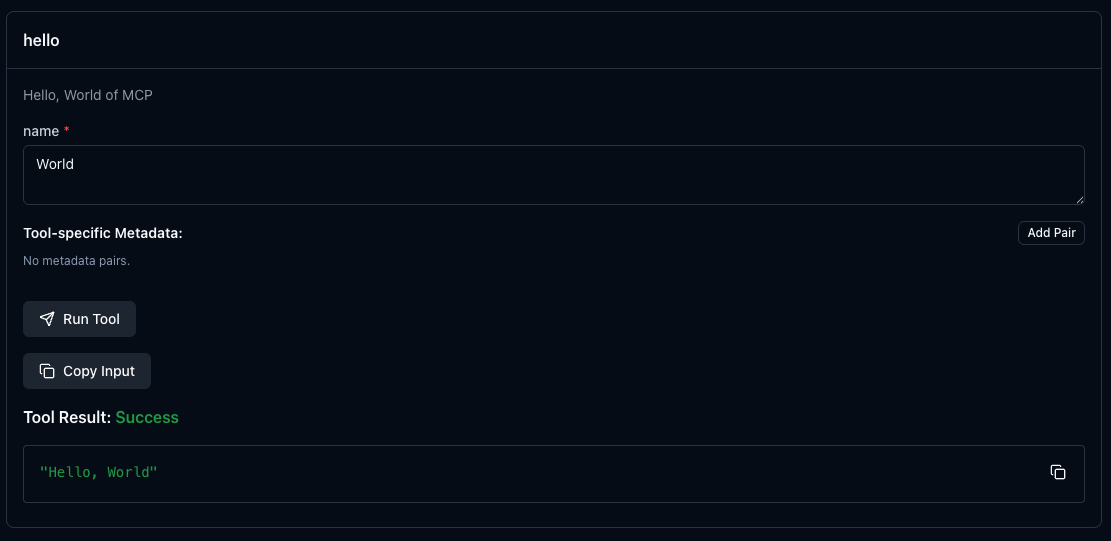
In this step your goal is to create a very simple MCP server, in essence the “Hello, World” of MCP. If you’re using an SDK, work through the examples on how to use it. You’ll find a list of the SDKs in the Getting Started section of the Model Context Protocol GitHub organisation.
If you’re going to really dig in, or there isn’t an SDK for your programming language, you can implement the protocol yourself using the MCP specification. It looks scary, but it’s just JSON-RPC over standard io or streamable HTTP. I’d suggest you do standard o first.
Your server should export a tool called hello and takes a string, that when called returns “Hello, <string>” replacing <string> with the value passed.
When you’re ready to test, check out step 2 to find out how, it’s going to look something like this:
Step 2
In this step your goal is to run the test shown above. To do that you’re going to use the MCP Inspector. Follow the instructions provided to install and use it. Be sure to set the transport and command correctly for the server you have built.
Then from the Tools box select List Tools and click on your newly created tool. After that find the section of the screen that shows your tool:
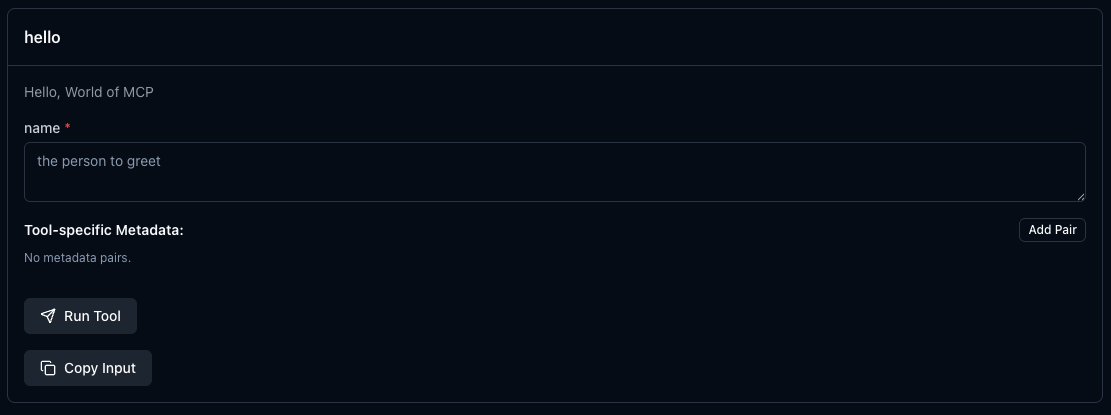
and enter some test data! If you get back the response shown in step 1, congratulations you’ve built an MCP server! Head to step 3 to make it do something a little more interesting and useful.
Step 3
In this step your goal is to provide a new tool to extract some data from the Coding Challenges Shared repository.
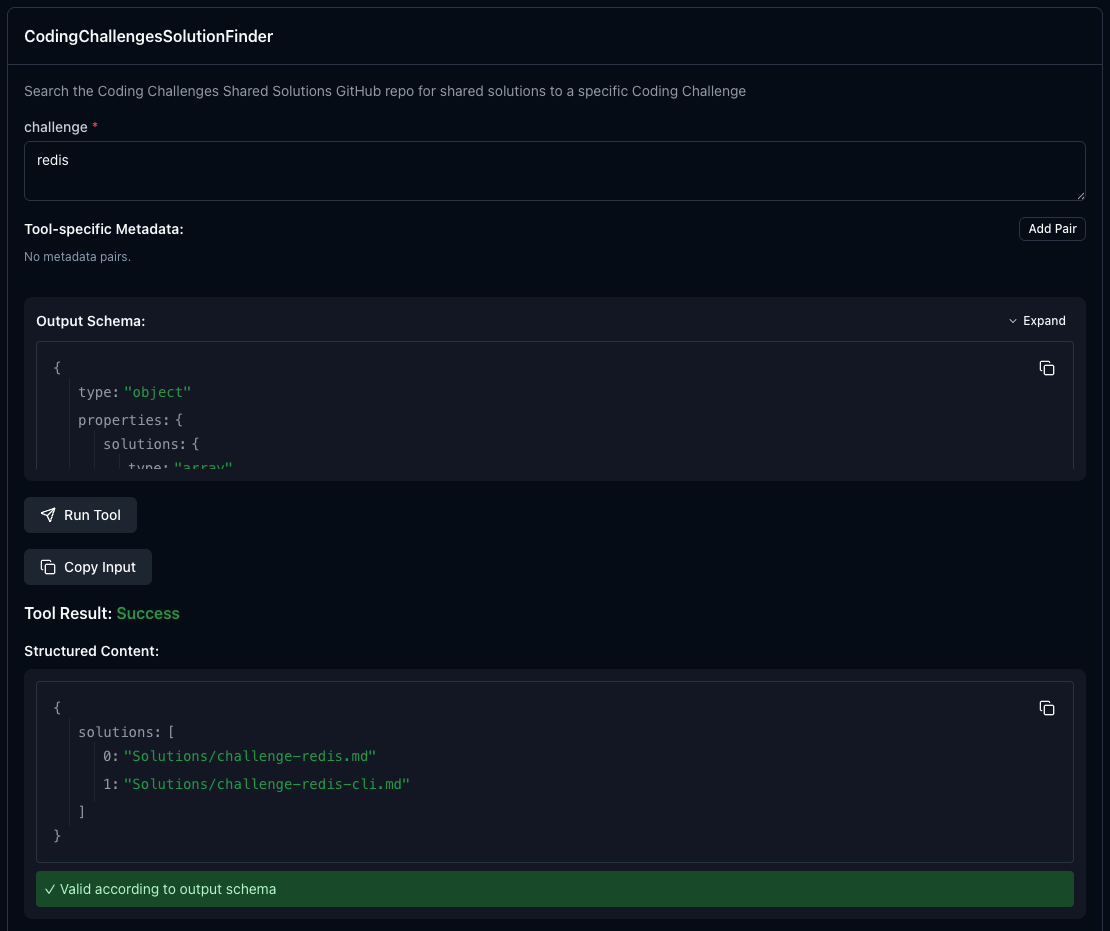
Firstly create a new tool: CodingChallengesSolutionFinder. It should take a single parameter, the name (or part of the name) of the Coding Challenge to look for and it should return a list of links to the relevant pages listing solutions to that Coding Challenge.
To implement it you will need to fetch the README.md from the Coding Challenges Shared repository list and find the data within it. Once you have done that update the MCP server to return the answer(s).
Here’s what that should look like when tested.
Step 4
In this step your goal is to handle any errors. For example make sure your tool can handle not being able to access GitHub, the format of the page changing or the coding challenge not being listed on the page.
Step 5
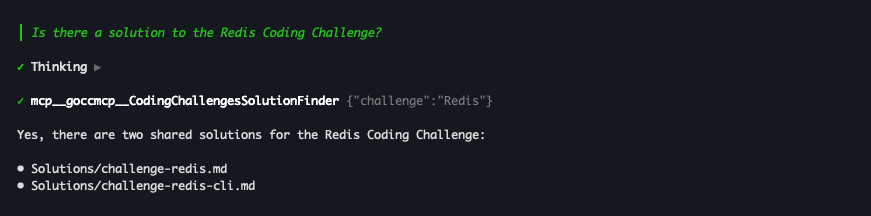
In this step your goal is to add your MCP server to your AI coding agent. Then use it to see if there is a solution to one of the Coding Challenges.
For example, here is Amp using my MCP server:
Step 6
In this step your goal is to extend your server to get the solutions for a particular challenge in a particular language. This will require you to follow the link found in step 3, download the content of that page and parse the table for a solution in the required language.
Going Further
You can take this idea further by creating other tools, for example:
- A tool to provide the documentation for your internal codebase.
- A tool to take specific actions on behalf of the agent, i.e. updating your team’s wiki page or project management software.
Help Others by Sharing Your Solutions!
If you think your solution is an example other developers can learn from please share it, put it on GitHub, GitLab or elsewhere. Then let me know - ping me a message on the Discord Server, via Twitter or LinkedIn or just post about it there and tag me. Alternately please add a link to it in the Coding Challenges Shared Solutions Github repo.
Get The Challenges By Email
If you would like to receive the coding challenges by email, you can subscribe to the weekly newsletter on SubStack here: